Tuesday, October 7, 2014

What is the difference between technology and assistive technology in the classroom?


Student using assistive technology
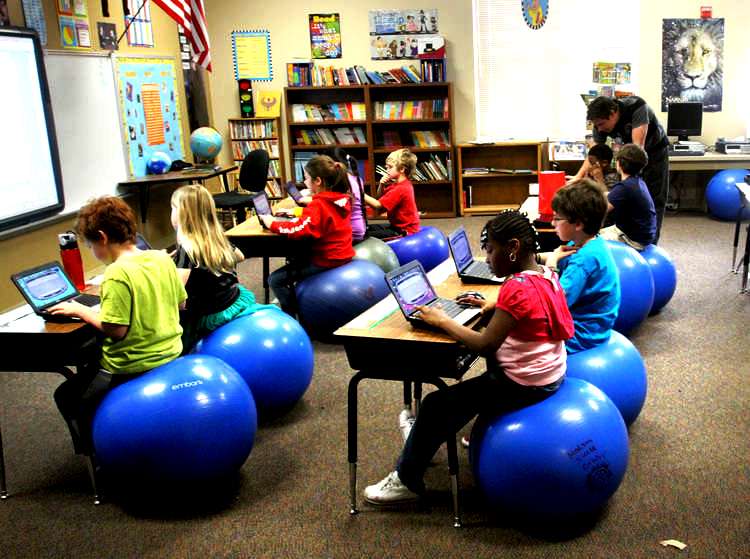
Classroom of students doing a lesson on mobile devices
 Our discussion really got me thinking about the difference between having plain old technology and software in the classroom and assistive technology and software in the classroom. It seems as if teachers and trainers need to have a deep awareness of the two and when they are being put to use. 
 
Assistive technology and software suggests that the technology is used to help adapt the curriculum for students with disabilities, enabling them to perform tasks “on level”.
Technology and educational software is used in the classroom to enhance the learning experience for the entire student cohort within any given structured lesson, not just a task.

I have seen some parents and schools consider 1:1 programs and think that it would be the greatest salve for their child or students that struggle with dyslexia or dyscalculia. The way I have come to understand assistive technology, nothing can be further from the truth. 

An assistive technology should be understood and implemented apart from using any other type of device to enhance instruction. For example text-to-speech is assistive technology software and Google Earth is software that can enhance instruction. A dyslexic student is entitled to have text-to-speech software and there should be personnel in the school to be sure that every dyslexic student is empowered with this software. 

Google Earth seems secondary to any text-to-speech software and in a different area of student learning. It enhances instruction and has a different purpose than text-to-speech. More students may benefit from Google Earth, but none of them are legally entitled to Google Earth because it helps them access the curriculum. 

We know that students with special needs must be integrated into the classroom. Most excellent teachers know that differentiation benefits the entire class and get excited about deploying brain-based learning techniques. So, it is time to integrate assistive technology into the classroom too with ongoing professional development and technical experts in the field.

Friday, September 26, 2014

My Multi Media Blog Entry


I am experimenting with using different types of media in my blog this week. Stuff that I know the students enjoy. GIFs, visuals, audio and whatever else I can get to work and might communicate a fun educational message. . .

When grading many history papers, one might find that we 
 reuse many corrective phrases. It may be more useful to 
correct students in a fun expressive way:

Your assertion needs to be backed up with specific historical evidence

Also, there are many events and people in history. Beware the vague pronoun reference (VPR), which will always keep you from accurately describing what you mean. A pronoun should have only one antecedent, the expression or meaning that gives voice to your sentence. Pronouns: he, she, they, we, etc. . .(and the dreaded, it).


The passive form is:
Please edit out as many forms of the verb "to be" as possible.

Oh and also use the Active Voice in  historical writing! Here is an example
 
Look at the above example of passive voice! Oh, 

Now look at this example of active voice: 

 Now that's an active sentence!


Sometimes it is fun to tell a historical perspective with a GIF. . . just for fun.

The general sentiments of the Puritan elders towards women in the Massachusetts Bay Colony

Everyone knows what went wrong at the Camp David Accords

They didn't dance it out.


Wednesday, September 17, 2014

Micro Blogging for Education


Sending the middle and high school students back to school this year, I noticed a distinct rise in the use of microblogging in the K-12 schools.  Microblogging seems to be occurring in various forms in the F2F school environment, but in my undergraduate online classroom, I barely use this format. Microblogging is a type of blogging where authors add content to their preferred platform in smaller, shorter text forms, videos or images.  It allows users to exchange ideas is small units, so it seems well suited for students who are trying to learn and understand new concepts because the micro delivery keeps topics focused and concise. Additionally, some schools use microblogging to deliver quick messages to parents. 

The principals in the middle and high schools in Montgomery County, Maryland use Twitter regularly to communicate with parents and the wider community. In fact, this set off quit controversy last winter when the superintendent of school’s decided to open school during a bout of below freezing temperatures and received some inappropriate Tweets from parents who felt he made the wrong decision. To his credit, the superintendent used the opportunity to begin a dialogue on cyber civility and modeling proper digital behavior. Here are some other examples of how principals using Tweeting to communicate with parents.

Inside the K-12 F2F classroom,  microblogging is used in productive ways. One AP Government teacher has a class Facebook page where she post all sorts of class announcements and holds study groups and review sessions. Students also use this page to communicate to each other expressly about the class to clarify homework assignments or discuss course content. The students are extremely responsive and the teacher notes that it is a unifying tool for the group. I have also seen a Freshman English class use Edmoto to run out-of-class discussion forums. The students are limited in their posting, so they are essentially create a microblog situation within their own Edmoto social network site.

In my online undergraduate history classes, I have not yet uncovered a way to use microblogging productively. Our discussion forums can take on the form of a microblog at times, creating a post and response or read/write feel of a microblog. Perhaps negotiating multiple social networking sites can be too much to ask adult students who are just returning to school and learning how to navigate an LMS for the first time. But, I may think of a way yet. 
In Blogs, Wikis and Podcasts, Richardson discusses safety and social learning. He notes that the teacher is responsible for keeping students safe in obvious ways, by not publishing names and faces, but most importantly by modeling appropriate use (13). Microblogging  really affords teachers the opportunity to model civil and safe behavior simply because it is so repetitive and requires so much direct adult involvement. Microblogging  demonstrates to students appropriate ways to use invaluable technology while teaching content. 

notes: 
 Richardson, W. Blogs, wikis and podcasts, and other powerful tools for classooms. Corwin publishers. Thousand Oaks, CA, 2010.